


With teams from across the country participating every year in Dig Pink® events, there are thousands of photo opportunities to capture the amazing things the volleyball community is doing to fight Stage IV breast cancer.
Receiving all of your pictures is one of our favorite parts of Dig Pink and we love being able to use and share them. We created this tip list in hopes that it would increase the number of amazing photos we receive each year. Don’t have a DSLR camera? No problem. Your phone can take amazing pictures and these 5 tips will help you do just that!
1. Use Grid Lines to Balance Your Shot
 It is very easy to turn this feature on by going to your camera settings and turning ‘grid lines’ on. Using the grid lines will help you balance your shot and apply the ‘rule of thirds’. “Rule of thirds’? What the heck is that? The rules of thirds is the idea that putting the important elements of a photo on one of the grid lines and/or intersections of the grid lines, will make for a more interestingly composed image. In the shot below, the little girl is placed on both a grid line and an intersection which makes for a well composed and adorable photo!
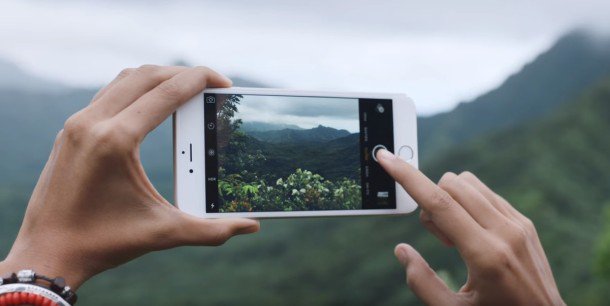
2. Hold Your Phone Like a Camera
Seems like a silly tip huh. BUT it’s no joke. Shooting horizontally makes your images more versatile and using two hands allows you to better stabilize your hands to reduce shake, leading to better quality, less blurry images.
“The future is an uncropped widescreen landscape, and it looks beautiful.”
Grayson Schaffer
3. Zoom with Your Feet
No I don’t mean use your feet to hold your phone. I mean if you want a closer shot, GET CLOSER. Using the zoom feature on your phone leaves images pixelated, grainy, and hard to use. Just like taking pictures horizontally, zooming with your feet makes your images more versatile. Can’t get close to your subject? Take your picture from a distance and crop it down later. This keeps you from losing image quality and allows you to still get the shot you want.
4. Set Focus and Exposure
We’ve all seen them. Those images that capture exactly what you wanted, that special moment…but everything is out of focus and the exposure is off. By spending a little extra time setting focus and exposure you automatically set yourself up for a better shot. It’s as simple as two quick clicks. Check out this video and learn to set your focus and exposure so you can capture that special moment in the right way.
5. Use Burst Features to Capture Action Shots
Your iPhone has a pretty cool feature called burst. This feature allows you to take rapid fire shots with one click. To engage burst hold down the capture button while in “photo” mode of your camera. This feature is great for action shots because it increases your camera’s shutter speed. While it’s not like using a professional camera, burst allows you to capture shots pretty quickly and then go back and save only your favorite ones.

Don’t miss out on taking awesome pictures like the ones below (All taken with a cell phone camera). Whether you own an iPhone or an Android device, you have a very powerful tool in your pocket that can produce quality photos with a few quick steps. So set yourself up for success and as always keep sending us photos from your events!
Send to: [email protected]